Are typed and drawn signatures legally binding?
A landlord writes: "Just email the lease back with your signature pasted in." Is that a real signature? For most everyday documents in the US and the EU, yes, it can be, because the law looks at whether you meant to sign and whether the signature is tied to the document, not at how the ink was made.
I work with signatures every day, but I am not a lawyer. What follows is the plain-language version of two official texts, the US federal ESIGN definitions and the EU's eIDAS Regulation, plus the habits that make a signed file easier to defend. Where a document is high stakes, treat this as a map of the questions to ask, not as the answer.
What the law looks at: intent and connection
The US federal ESIGN Act, in 15 U.S.C. § 7006, defines an electronic signature as an electronic sound, symbol or process attached to or logically associated with a contract or other record, and executed or adopted by a person with the intent to sign the record. Three things carry the weight there:
- A symbol or process. A typed name, a drawn image, a click on "I agree" can all qualify. The look does not decide it.
- Attached to or associated with the record. The signature has to belong to this specific document, not float in a separate message.
- Intent to sign. You must have meant it to be your signature on that record.
Most US states have their own counterpart law, commonly known as UETA, that works in a similar way at state level. The details differ, which is another reason to ask when the document matters.
The EU view: three tiers
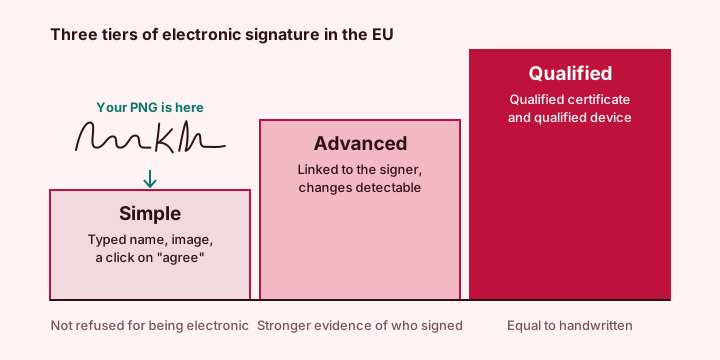
The EU's eIDAS Regulation (EU) No 910/2014 sorts electronic signatures into three levels. Article 25 says that no electronic signature can be denied legal effect, or admissibility as evidence, solely because it is electronic, and that a qualified electronic signature has the same legal effect as a handwritten one.
| Tier | What it takes | Legal effect |
|---|---|---|
| Simple | Data in electronic form attached to or associated with other data, used by the signer to sign. A typed name or a pasted image fits. | Cannot be refused only because it is electronic. Its weight depends on the facts and the evidence. |
| Advanced | Uniquely linked to the signer, able to identify them, created under the signer's sole control, and linked to the data so later changes can be detected. | Same non-refusal rule, usually stronger evidence. |
| Qualified | Advanced, plus created with a qualified signature device and based on a qualified certificate. | Same legal effect as a handwritten signature. |
Where a pasted signature image sits
A PNG made in a signature generator and placed on a document is a simple electronic signature. That is not an insult. For a lease, a quote, a school form or an invoice, a simple signature is what most people mean when they say "e-sign", and the law does not disqualify it for being electronic.
Its limit is evidence, not validity. An image is easy to copy, and by itself it proves neither who placed it nor when. So if someone later disputes the document, you rely on the surrounding facts: the email it was sent from, the agreement to sign this way, the file you kept. The habits further down are about building that trail.
Electronic versus digital signatures
People use the two words as if they were the same. In practice they are not.
| Compared | Electronic signature | Digital signature |
|---|---|---|
| What it is | The broad category: typed name, drawn mark, image, click | A specific technique using a certificate and cryptography |
| Proves identity | Only through surrounding facts | Through the certificate and its issuer |
| Shows later edits | No | Yes, the seal breaks if the file changes |
| What the tool makes | This one, as an image or vector file | Not this |
Laws in some countries use the word "digital" for a certificate-based signature only. A drawn or typed image must not be described as one.
Documents that commonly still need more
Some documents are carved out or carry extra formalities, and the list differs from place to place. I treat these as "check first" categories:
- Wills and similar documents about what happens after death.
- Many real-estate transfers and some deeds, which often also need a notary or witnesses.
- Certain family-law documents.
- Some court filings and government forms, which may require a specific system, a wet signature or a qualified signature.
- Powers of attorney, depending on the country and the purpose.
These are "commonly" and not "always". The right question to ask the receiving office is simple: "Which kinds of signature do you accept on this form?"
Habits that make a signed file hold up
- Agree on the method first. A line in the email, "I will sign electronically and send the PDF back", is enough for most routine documents.
- Send from your own address. The email header ties the document to you more convincingly than the picture does.
- Keep the sent message and the final file. Together they are your record of what was signed and when.
- Sign the final text. Never sign a blank, a draft or a page you have not read.
- Use the same signature each time. It helps anyone comparing your documents. See how to create your own signature.
- Sign only as yourself. Putting someone else's signature on a document, even with a tool, is not covered by any of the above.
- Remove the image from shared computers. Delete the download when you finish.
What an image cannot do for you
An image from a signature generator has no audit trail, no timestamp and no tamper seal. If the other party needs those, ask which method they accept. Many organisations use a signing service that adds an audit trail, and some regulated fields require a qualified signature with a certificate. That is a different product from a PNG, and no image, however good the script, replaces it.
If you only need the practical side, placement and sizing are covered in how to insert your signature in Word, Google Docs and a PDF.
Quick answers
Is a typed or drawn electronic signature legally binding?
For many everyday documents it can be, because US and EU law do not refuse a signature only for being electronic. What counts is intent to sign and the link to the document. This is general information, not legal advice.
What is the difference between an electronic signature and a digital signature?
Electronic signature is the broad category, from a typed name to a drawn image. A digital signature is a specific certificate-based technique that identifies the signer and shows later changes.
Is a pasted signature image a qualified electronic signature?
No. In the EU terms it is a simple electronic signature, the lowest tier. A qualified signature needs a qualified certificate and a qualified signature device.
Which documents may still need a wet signature?
Wills, many real-estate transfers and deeds, certain family-law documents and some court or government forms commonly still need wet ink, a notary or a qualified signature. Ask the receiving office.