How to create your own signature that stays consistent
Sign a passport form with one scrawl, a bank card with a tidier one and a lease with a third, and sooner or later someone behind a counter will ask you to sign again. A good personal signature is not the prettiest one. It is the one your hand can repeat without you thinking, in a hurry, at the size of the box in front of you.
Below is how I design one from scratch: what to build it from, how to keep it steady, which flourishes to keep, and how to use typed handwriting styles as a sketchpad rather than a copy. Nothing here claims a signature reveals your character. It is a mark, and the only test that matters is whether it is the same mark every time.
What a signature actually has to do
Three jobs, in this order:
- Be repeatable. Banks, ID offices and landlords compare signatures with earlier ones. Ten signings should look like close relatives.
- Be quick. If it takes you five seconds and both hands, you will start cutting corners, and then it is no longer the same mark.
- Be yours. A shape someone cannot guess from your printed name.
Readable is not on the list. Most offices do not require a legible signature, and a printed name usually sits beside it anyway. Readable only helps when you sign rarely and want the signature to look deliberate.
Pick a pattern first
Almost every signature is one of five patterns. I choose the pattern before I touch the shape, because it decides how fast and how repeatable the result will be. The example name is made up.
| Pattern | Looks like | Speed | Best for |
|---|---|---|---|
| Full name, joined | Anna Keller | Slow | Letters, certificates, a formal sign-off |
| First name plus surname initial | Anna K. | Fast | Everyday forms and delivery slips |
| Initial plus surname | A. Keller | Medium | Contracts, where the surname should be findable |
| Initials only | AK | Very fast | Page corners, change marks, short approvals |
| Capital plus a stroke | A, K and a long tail | Very fast | People who sign many times a day |
If you sign often, pick a row from the lower half. If you sign twice a year and it has to look careful, pick one of the first two.
Design it in six steps
- Write your name five times in your ordinary hand. Big, on unlined paper, with the pen you actually use. Notice which letters your hand makes with the most energy. Those are usually the first letter of each name.
- Choose a pattern from the table and cross out the rest. Do not mix two.
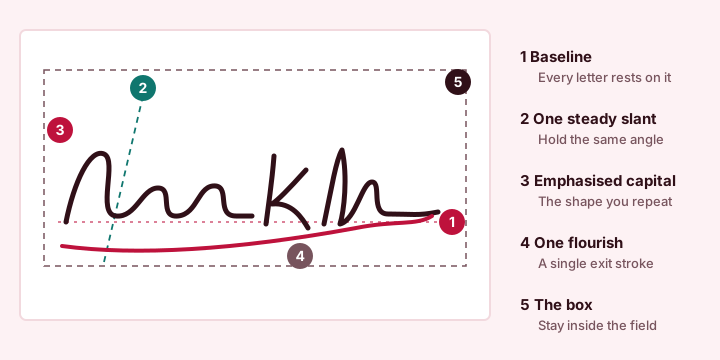
- Fix the slant. Pick one angle and keep it. A signature that leans a little forward looks quick and confident. The exact angle matters less than not changing it between signings.
- Keep one flourish. An underline, a long exit stroke or a looped capital. One. Two flourishes double the chance of a different result on a bad day.
- Test it small. Sign at the size of the smallest box you will meet, not on a sheet of A4. Scaling a small signature up for a letter is easy. Squeezing a big gesture into an ID box is not.
- Sign twenty times, keep the three most alike and practise those until the hand does it without you. Then stop editing.
Flourishes: what helps and what hurts
| Feature | Helps when | Hurts when |
|---|---|---|
| Forward slant | You hold the same angle every time | It drifts from upright to leaning depending on mood |
| Underline | It is a single, quick stroke below the name | It runs into the printed text under the line |
| Large looped capital | It is the one distinctive shape you can repeat | The loop closes differently each time |
| Long exit tail | It stops inside the box | It leaves the field and looks like a stray mark when scanned |
| Crossing strokes | It happens once, at the end | Several crossings blur into a knot at small sizes |
| Dots over i and j | You keep them as small dots | They become dashes or circles at random |
My rule of thumb: if you cannot draw the signature in one continuous pen movement with at most one lift, it is too complicated to stay consistent.
Use a signature generator as a sketchpad
Type your name into the signature generator and scroll through the styles. Do not look for a font you want to copy whole. Look for features: a tall, narrow capital, a gentle backward connection, rounded loops, a quick horizontal exit. Note two or three, then pick up a pen and rebuild those features in your own hand.
- Typed as the final signature is fine for electronic documents. It is consistent by construction, which is its main advantage. Pick one style and keep it. Changing fonts per document is the typed version of signing differently every time.
- Drawn is the better choice when the receiving party might compare it against ID. Draw it larger than the box, with a finger on a phone held in landscape or with a stylus, then export at the small size you need. The dashed baseline on the pad is only a guide and never appears in the file.
- Check every letter. Names such as José, Müller or Łukasz need a font that has those letters. The preview shows a note when a style lacks one; choose another style instead of letting a different font fill the gap.
The tool runs in your browser and the handwriting fonts are built into the page, so what you see is what lands in the PNG.
Initials: the short version of your signature
Contracts and leases often ask for initials on each page. Make them the abbreviated twin of your signature: same pen, same slant, and the same shape for the first letter. Taking the first letter of every word, hyphen-separated names included, gives MJW for Mary-Jane Watson and JGL for José García López. Whether you use dots (M.J.W.) or not is style; choose one and stay with it.
Initials sit in tiny boxes, so export them small. The Small preset, 1 in or 2.5 cm wide, gives a PNG 300 px or 295 px wide at 300 dpi, which fills a page-corner box without a trace of blur.
Sizing for the box in front of you
Measure the line with a ruler before you export. A signature drawn at screen size and stretched later prints soft, so choose the width in inches or centimetres and let the file be made at that size.
| Where it goes | Width on paper | PNG width at 300 dpi |
|---|---|---|
| Initials box | 1 in (2.5 cm) | 300 px (295 px) |
| Signature line on a form | 2 in (5 cm) | 600 px (591 px) |
| Letter or contract | 2.5 in (6.5 cm) | 750 px (768 px) |
| Certificate or large block | 3.5 in (9 cm) | 1050 px (1063 px) |
Those PNG widths include a small transparent margin, so the ink never touches the edge. Getting the file into a document at exactly that width is covered in how to insert your signature in Word, Google Docs and a PDF.
Mistakes I keep seeing
- A new style for every document. Pick one and keep it.
- Loops that eat the name. A beautiful script face can turn a short surname into an unreadable chain. Look at the preview at the real size.
- A white box over a coloured field. Save with a transparent background for forms and letterheads.
- A tiny screen-size PNG stretched in Word. It prints blurry. Export at the printed size.
- Leaving the image on a shared computer. Delete the download when you finish, and avoid uploading it to unknown converters.
- Assuming an image equals a certificate. A pasted signature image is a simple electronic signature. What that means for a particular document is in are typed and drawn signatures legally binding.
Only sign as yourself. A signature you have designed is yours to use, and nobody else's.
Quick answers
Does a signature have to be readable?
No. Most banks and offices do not require a legible signature, and a printed name usually sits beside it. What matters is that it stays recognisably the same each time you sign.
Can I use my initials as my signature?
Yes, many people do. Initials are fast and easy to repeat, but they carry less detail, so use a fuller pattern where the document or office expects your name to be findable.
Which font looks most like a real signature?
Thin, quick, slightly slanted connected faces such as Herr Von Muellerhoff or Marck Script read most like a hurried hand. Check the preview at the real size and make sure every letter of your name is present.
How do I draw a signature on a phone?
Hold the phone in landscape, draw larger than the final size with a finger or stylus, and let the tool export it small. Drawing big gives smoother curves than a tiny, cramped signature.