Signature Generator: Type or Draw a Signature That Fits the Line
A signature line on a form is about 2 inches long, and this signature generator makes a handwritten signature, typed in a script font or drawn by hand, that lands on it at the right size. You get a transparent PNG for paper, an email version and matching initials.
- Your signature is drawn and saved on this device only. Nothing is uploaded.
- Only sign as yourself.
Recent exports
Don't tick this on a shared computer.
Keyboard shortcuts
| 1 | Type mode |
| 2 | Draw mode |
| Ctrl/⌘ + Z | Undo the last stroke |
| Ctrl/⌘ + Shift + Z | Redo |
| ? | Show this help |
| Esc | Close this help |
Type or draw: which signature suits the job
I use both, for different jobs: a typed signature is quick and identical every time; a drawn one is your actual hand, and that is why people recognise it.
- Type for an invoice, a school form or a quote you sign every week. Your name appears in 20 embedded handwriting fonts, from formal script to quick scrawl. Names like José or Łukasz are checked letter by letter, and a card says so if its font lacks one of your letters (Rouge Script, for example, has no Ł).
- Draw when it should match your passport or bank card. Mouse, finger and stylus all work; the line thins as you speed up, like a ballpoint (a stylus uses its pressure instead), and a single tap leaves a dot, so the dot over an i survives. A dashed baseline keeps you level and is never exported, Clear asks first and Undo brings the drawing back, and you can save it as PNG or SVG.
My tip for phones: sign big, using the whole pad, and let the export shrink it. Small finger signatures look shaky; large ones shrink into something that looks like ink. Turn the phone sideways for room — the strokes are kept as vectors, so rotating does not cut them.
One rule before anything else: only sign as yourself. A signature generator makes a picture of a name; using someone else's is still signing for them.
Signature generator sizes for paper and email
"It prints blurry" and "it pasted in huge" have one cause: a screen-sized PNG that says nothing about its size on paper. Pick the output by the width of the line instead, and the export is rendered at 300 dpi for that width. If your line is none of the four presets, choose Custom and type 0.5 to 8 inches or 1 to 20 cm; a result line such as "600 × 150 px · 2.00 in at 300 dpi" tells you what you will get.
| Use | Inches | PNG width | Metric | PNG width |
|---|---|---|---|---|
| Initials box | 1 in | 300 px | 2.5 cm | 295 px |
| Form signature line | 2 in | 600 px | 5 cm | 591 px |
| Letter or contract | 2.5 in | 750 px | 6.5 cm | 768 px |
| Certificate, large line | 3.5 in | 1050 px | 9 cm | 1063 px |
Pixels alone do not tell Word how big to make the picture; the PNG's density field (the pHYs chunk) does, in pixels per metre: 300 ÷ 0.0254 = 11,811 px/m. Every print-size export carries it. Without it, Word assumes 96 dpi.
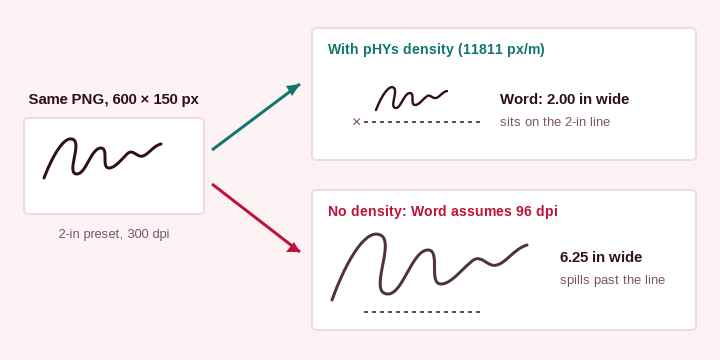
Worked example. A lease has a 2-inch signature line. Choose the 2-in preset: 2 × 300 = 600 px wide, density 11,811 px/m. Word inserts it at 600 ÷ 300 = 2.00 in and it sits on the line. The same 600-px file without density arrives at 600 ÷ 96 = 6.25 in. On a metric form, a 5 cm line gives 5 ÷ 2.54 × 300 = 590.6, rounded to 591 px; a 9 cm certificate line gives 1063 px.
Email is different: the image is shown pixel for pixel, not printed. Google recommends a Gmail signature image of about 70–100 px high and 300–400 px wide (Gmail signature help), so the email preset fits the cropped ink inside 400 × 100 px, never enlarges it and switches the background to white:
- a drawn signature with an ink box of 1200 × 300 px → scale ⅓ → 400 × 100 px, exactly Gmail's upper height;
- a long one-line name at 1600 × 300 px → scale ¼ → 400 × 75 px;
- a compact 600 × 300 px monogram → scale ⅓ (the height limits it) → 200 × 100 px.
Transparent or white background
For paper I always export transparent: the PNG lies on a ruled form or coloured letterhead without the white box that gives a pasted signature away. For email I switch to white, because in dark mode black ink on transparent sits on a near-black screen and vanishes. If you want transparent in email anyway, use ballpoint blue rather than black.
Putting it into Word, Google Docs, a PDF and Gmail
- Word. Insert > Pictures, then Wrap Text > In Front of Text and drag it onto the line. Type your name and title under it, select both and save them via Insert > Quick Parts > Save Selection to Quick Part Gallery; the whole block is then one click away under AutoText (Microsoft Support).
- Google Docs. Insert > Image > Upload from computer, then set the image option to In front of text.
- PDF. In Adobe Acrobat Reader, Fill & Sign lets you add a signature from an image file; macOS Preview builds its own signature from a trackpad drawing, the camera or an iPhone, so for a PNG use a reader with an image option.
- Gmail and Outlook. Use the email-size PNG with the image button in the signature editor. Gmail counts the image towards its 10,000-character signature limit, and an image taken from Google Drive only shows if the file is shared publicly.
Step-by-step versions, with the usual trouble spots, are in how to insert your signature in Word, Google Docs and a PDF.
Choosing a style that reads as you
A signature is a mark you will repeat for years, and banks and ID offices compare new ones with old ones. What I tell people designing their first:
- Formal scripts with high contrast and loops suit certificates and letters; keep them to short names, or the loops tangle.
- Everyday hands are my default for contracts and forms: they read as real without looking theatrical.
- Quick scrawls are how most adults actually sign: a clear first letter, the rest compressed.
- Initials. For leases you initial every page. Each typed card has matching initials in the same font and colour: "Mary-Jane Watson" becomes MJW or M.J.W., exported at the 1-in preset, 300 px wide.
Read every letter in the preview before you pick, then stick with one style; a different font on every document makes your signatures look inconsistent. More on slant, baseline and flourishes in how to create your own signature.
Is a typed or drawn signature legally valid?
This is general information, not legal advice. Rules differ by country and by document — ask the receiving office or a lawyer when it matters.
In the US, the ESIGN Act defines an electronic signature as a sound, symbol or process attached to or logically associated with a record and adopted by a person with the intent to sign it (15 U.S.C. § 7006). What carries weight is your intent and the link to the document, not how pretty the ink is.
In the EU, eIDAS (Regulation 910/2014, Art. 25) says an electronic signature cannot be refused legal effect just because it is electronic, but only a qualified electronic signature, which is certificate-based, has the effect of a handwritten one. A pasted signature image is a simple electronic signature, the lowest of the three tiers. Wills, notarised deeds and some government and court forms commonly still need wet ink or a qualified signature. The background, without the jargon: are typed and drawn signatures legally binding?
Keeping your signature to yourself
- Everything is drawn and exported in your browser; even the fonts are embedded, so your name is never sent anywhere.
- Remembering recent signatures is off by default; it is a tick box labelled "Remember my last signatures on this device". Turn it on only on your own device.
- On someone else's computer, delete the PNG from Downloads when you are done.
- Do not upload your signature to "remove background" or converter sites; this export is already transparent.
Under the ink: how the export is built and tested
I wanted a signature generator to treat a signature the way a print shop treats a logo file:
- Real fonts. Open-licence handwriting faces (SIL Open Font License or Apache 2.0, with the licence notice kept) are embedded in the page, so nothing is requested from Google, preview and export match on every device, and buttons wait until a font has loaded.
- Crop to the ink. The signature is rendered on a generous canvas and cropped to the pixels that carry ink, so swashes are never cut. Then an even margin of 4 % of the larger side, at least 8 px, is added: 24 px for 600 × 150, 8 px for 150 × 60.
- Size and density. The image is scaled to the preset at 300 dpi and the density field is written. Drawn signatures are re-rendered from the stored strokes, not copied from the screen, and can also be saved as SVG.
- Ink that behaves like a pen. Width follows speed, smoothed as in the open-source signature_pad model, or stylus pressure. The pen width you set (1 to 10 px, default 3) is the thickest line; the thinnest is a quarter of it.
Some of the browser checks the tool must pass, with expected values recomputed separately:
| Input | Expected result |
|---|---|
| Preset width: 2 in, 1.5 in, 5 cm, 4 cm, 1 in | 600, 450, 591, 472, 300 px wide |
| Density of an exported 2-in PNG | pHYs right after the header, 11,811 px/m on both axes, unit metre; width 600 px |
| Email fit of ink boxes 1200 × 300, 1600 × 300, 600 × 300, 300 × 60 | 400 × 100, 400 × 75, 200 × 100, 300 × 60 (no enlarging) |
| Single tap in the middle of the drawing pad | one stroke stored, Download enabled, the PNG contains ink |
| Margin around the ink for 600 × 150, 1200 × 300, 150 × 60 | 24, 48, 8 px |
| Initials of "Mary-Jane Watson", "josé garcía lópez", "Anna" | MJW / M.J.W., JGL / J.G.L., A / A. |
| A 100-character name, and a long name in Herr Von Muellerhoff at 200 % | no ink in the outer 1-px border: nothing is clipped |
| Drawing pad narrowed from 600 to 300 px | ink box halves (±1 px); the export is still 600 px wide |
| File name for "José Müller" | signature-jose-muller.png |
Limits: typed signatures export as PNG only; the fonts cover Latin letters with common accents, not Chinese, Arabic or Cyrillic; and the tool does not open PDFs — you place the PNG with your own PDF reader.
Quick answers
Is this signature generator free, and do I need an account?
It is free, with no account, no sign-up and no watermark. Your signature is made and saved in your browser, and nothing is uploaded.
How do I get a signature with a transparent background?
Leave the background set to transparent and download the PNG. It is cropped to the ink with a small even margin, so it sits on a form line or coloured letterhead without a white box.
What size should a signature image be for email?
Keep it within about 400 px wide and 100 px high; Google recommends 70–100 px high and 300–400 px wide for Gmail. The email preset fits your signature inside 400 × 100 px and switches to a white background, with a note, so it stays visible in dark mode.
Why does my signature come out huge or blurry in Word?
The PNG was screen-sized and had no density information, so Word treated it as 96 dpi. Export at the width of the line instead: a 2-in preset gives 600 px at 300 dpi, and Word places it 2 in wide.
Can I use my initials as a signature?
Initials are fine for initialing the pages of a contract, and some people sign with them altogether. For an ID or bank card, check what the office accepts and use the same form every time.
Is a drawn or typed signature the same as a digital signature?
No. A signature image is a simple electronic signature; a digital signature is certificate-based and proves who signed and that the file was not changed. This is general information, not legal advice.
Can I draw my signature with a finger and save it as SVG?
Yes. Draw on the pad with a mouse, finger or stylus and download it as PNG or SVG. The SVG holds only the strokes as paths, with no script, and uses the width you chose.
Guides
 How to create your own signature that stays consistentFive patterns, six steps and a few flourish rules for a signature your hand can repeat, plus initials and sizes.Reading time: 7 min
 How to insert your signature in Word, Google Docs and a PDFExport at the printed width, then place the PNG in Word, Google Docs, a PDF or an email signature without a white box.Reading time: 7 min
 Are typed and drawn signatures legally binding?What the ESIGN Act and eIDAS say about typed and drawn signatures, where an image fits and what still needs wet ink.Reading time: 6 min
Updated · About this site